You can download two free salary voucher templates in Microsoft Word, Classic Ledger and Simple Stub, to record a salary payment and give your employee written proof of pay. Both use US payroll lines such as federal and state income tax, Social Security and Medicare. Fill one in each pay period, print it, and have both sides sign.
Free salary voucher templates to download
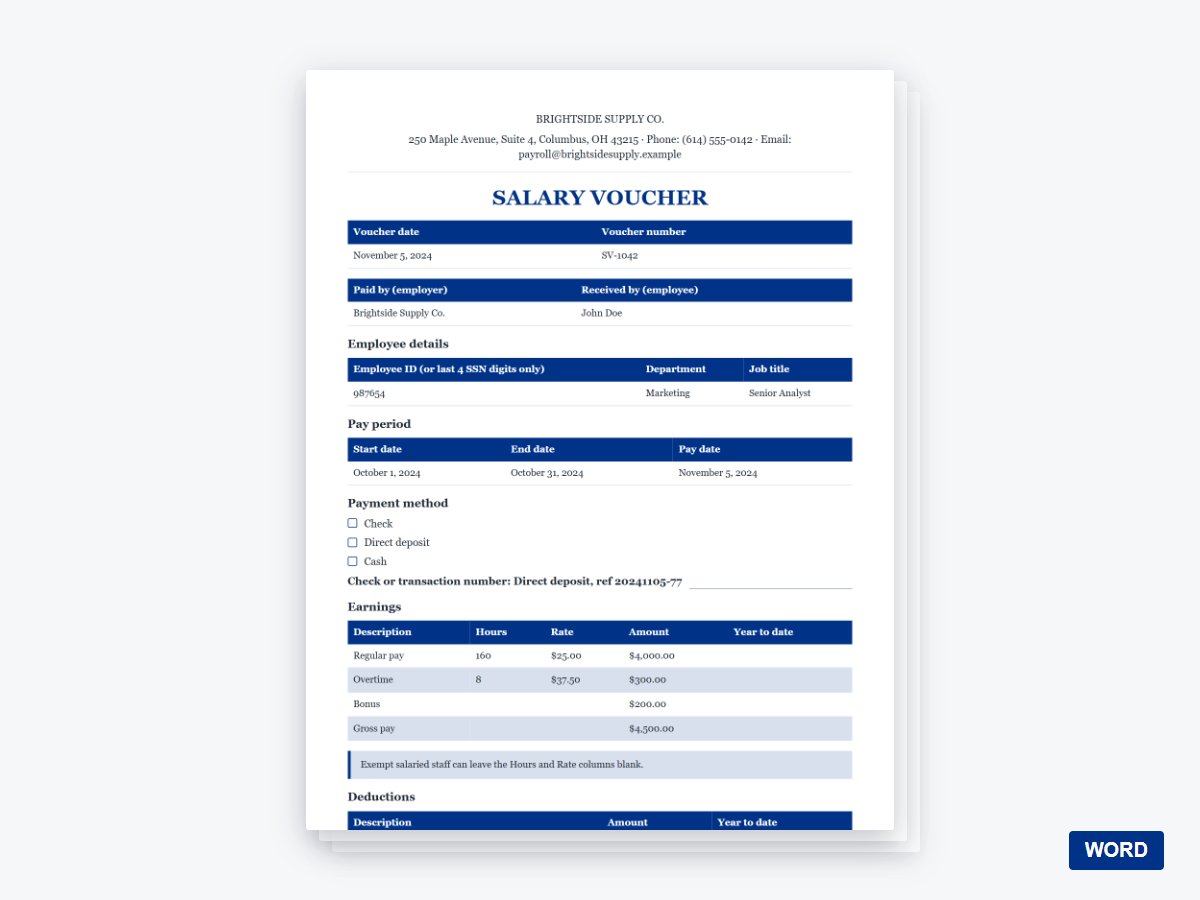
Classic Ledger
A formal, bordered voucher with ruled tables, suited to established businesses and payroll offices that keep paper records.
Download:
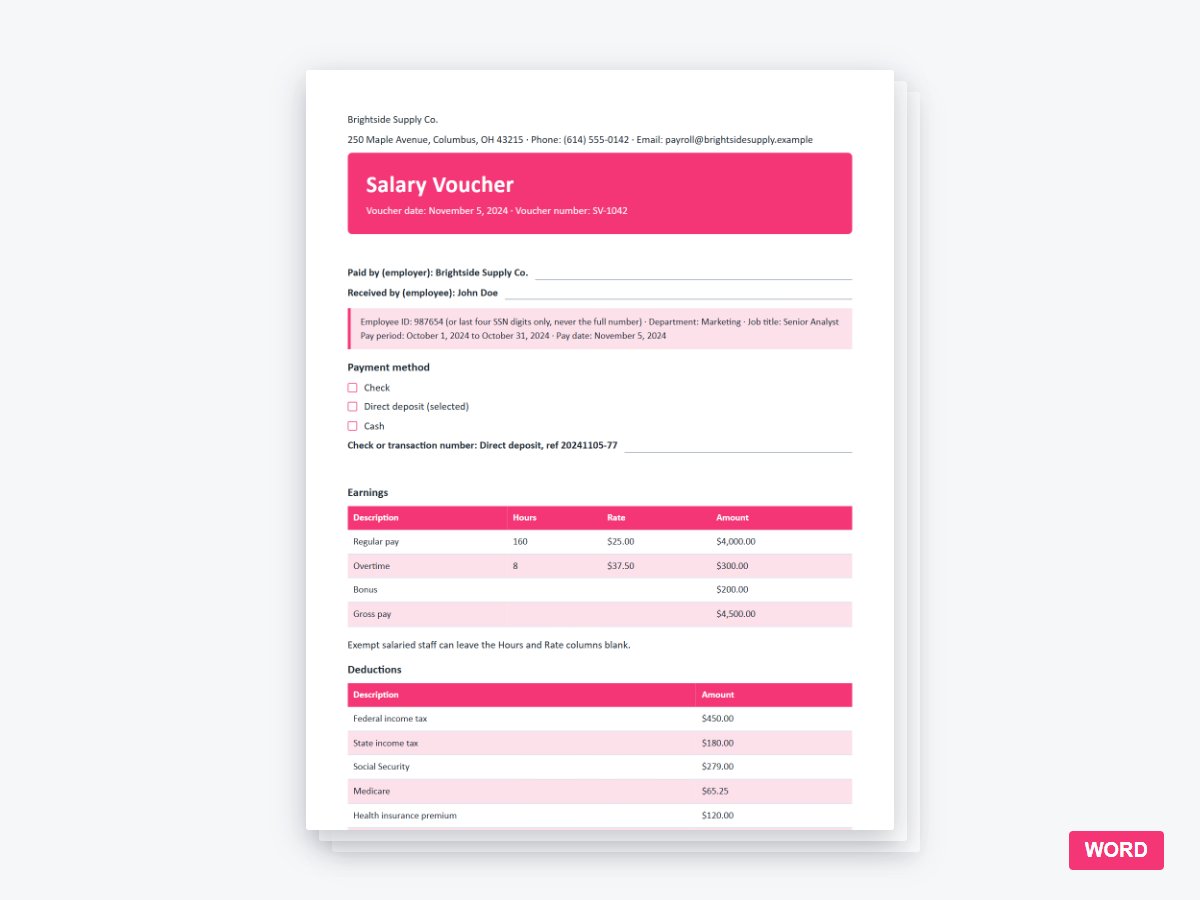
Simple Stub
A clean, modern voucher with a coloured header band and side-by-side earnings and deductions, ideal for small businesses and household employers.
Download:
What is included
Each design lays out the same core information in its own style.
- Employer and voucher details: Both designs have "Paid by (employer)" and "Received by (employee)" fields. Classic Ledger adds a table for the voucher date and voucher number.
- Employee details: Classic Ledger has a table for employee ID (or the last four SSN digits only), department and job title.
- Pay period and payment method: Classic Ledger has a table for the start date, end date and pay date. Both designs include a payment method checklist and a field for the check or transaction number.
- Earnings and deductions: Both have an earnings table (description, hours, rate, amount) and a deductions table (description, amount). Simple Stub places them side by side under a coloured header band.
- Year to date and signatures: Classic Ledger adds a year-to-date column to both tables. Simple Stub has a separate year-to-date table for gross, deductions and net. Both end with signature lines.
Classic Ledger suits payroll offices that keep paper records. Simple Stub works well for small businesses and household employers.
How to fill it in
- Pay period. Enter the inclusive start and end dates of the pay period, then the pay date.
- Earnings. List each earnings line with its hours and rate, then add the amounts to get gross pay.
- Deductions. Describe each deduction, such as federal income tax, state income tax, Social Security or Medicare, and add them up.
- Net pay. Subtract total deductions from gross pay. In the sample, $4,500.00 minus $1,229.25 leaves a net pay of $3,270.75. Employees check this math most, so double-check it before printing.
- Sign. The employee and employer both sign and date the voucher, and each keeps a copy.
Salary receipt or pay stub?
People use these two terms for the same thing, but they do different jobs. A salary receipt confirms that the employee received their net pay. A pay stub itemizes the earnings and deductions behind that figure. These templates combine both, so one sheet shows the breakdown and the signed acknowledgement.
A signed salary receipt is useful to both sides. Employees can use it as proof of income when applying for loans, credit cards or mortgages. Employers can point to it as a record if there is ever a dispute over how much was paid.
If you pay exempt salaried staff, California does not require total hours on their statements. You can leave the hours column blank for those employees.
Check your state's rules
Under the Fair Labor Standards Act, employers must keep accurate payroll records, but federal law does not set a format for a pay statement. Many states have their own wage statement rules, and they differ. Ohio, for example, wants each addition and deduction listed with its purpose, and Texas wants the purpose of each deduction shown.
California has some of the most detailed rules. Its Labor Code section 226 requires an itemized statement that includes:
- Gross wages and net wages
- All deductions
- The inclusive dates of the pay period
- The employer's legal name and address
- The employee's name with either the last four SSN digits or an employee ID
- Total hours worked and each hourly rate with its hours (hours are not needed for exempt salaried staff)
California employers must keep a copy of each wage statement and deduction record for at least three years. If a current or former employee asks to see or copy their records, the employer must respond within 21 calendar days. The link above goes to a republished copy of the statute, so check the current official text before you rely on it.
Keep in mind that a salary voucher is not a W-2 or any other tax form, and it does not replace the official records in your payroll system. This page is general information, not legal advice. Check your state's current law or ask a payroll or employment professional if you are unsure what your statements must show.
If you need a general form for other business payments, see our payment voucher templates. You can also browse the full range of voucher templates on the site.